Premium
v1.0
iStudy - University Dashboard UI Concept Dark Version
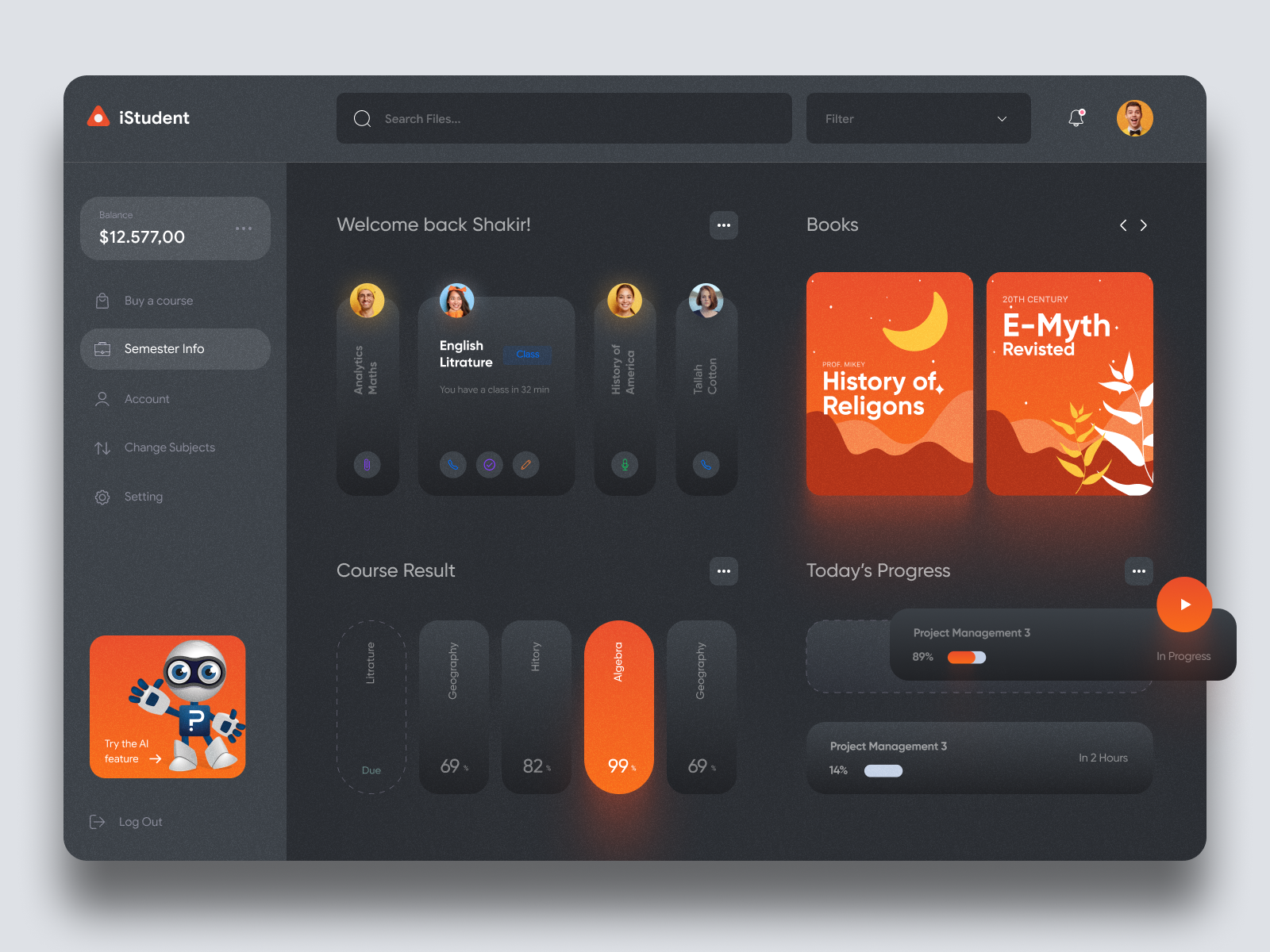
Modern education UI design in Figma format. Easy navigation, interactive elements, and seamless course management enhance student engagement. Copy-paste ready.

About iStudy - University Dashboard UI Concept Dark Version
Experience a sleek and intuitive user interface design tailored for online educational platforms, perfect for enhancing student engagement and managing course activities with ease. This UI design offers a modern, visually appealing dashboard layout with a focus on usability and functionality. Featuring a prominent balance display, seamless navigation through courses, and a user-friendly sidebar menu, it ensures effortless access to key information like semester details, account settings, and course management. The design also incorporates interactive elements for viewing course results, managing daily progress, and accessing study materials. Available in a convenient Figma format, you can effortlessly copy and paste it into your Figma workspace without the need for downloading, making it a must-have tool for designers aiming to create cutting-edge educational interfaces effortlessly.
Features
- Interactive Dashboard
- Figma Ready
- User-Friendly Navigation
- Comprehensive Course Management
- Modern Aesthetic
- Sidebar Menu
- Visual Engagement
- Suitable for Education Platforms
Frequently Asked Questions
What format is this UI design available in?
This UI design is available in a Figma file format.
Can I edit this design directly in Figma?
Yes, you can copy and paste the design directly into your Figma workspace without downloading.
Is this UI suitable for educational platforms?
Yes, it is specifically designed for online educational platforms.
What features does the sidebar menu include?
The sidebar menu includes semester info, account settings, course changes, and more.
How is course progress displayed?
Course progress is displayed with interactive elements for today's progress and future tasks.
Does the design include a balance display?
Yes, there is a prominent balance display on the left panel.
What can users access through the main dashboard?
Users can access courses, books, progress, and class schedules easily through the main dashboard.
Is there support for interactive elements?
Yes, the design supports interactive elements for dynamic user engagement.
How can users manage course results?
Users can easily manage and view their course results through the designated section.
Is this design mobile-friendly?
The description does not specify, but it's designed for desktop use. Adapting for mobile would depend on further customization.
Premium License
Unknown Size
More like this
View all
eLearning Platform Dashboard UI
631
U
UI Dux
Figma
XD

Digital Wallat Web App Dashboard
684
U
UI Dux
Figma
XD
Free
Dashboard Top Nav
281
U
UI Dux
TV App Interface
359
U
UI Dux
Figma
XD
Free
Dashboard Sidebar Navigation
587
U
UI Dux
Fintech Dashboard UI Concept
631
U
UI Dux
Figma
XD
FinVerse - Finance Dashboard App UI Dark Layout
639
U
UI Dux
Figma
XD
MyCloud - Dashboard UI For Cloud File Storage Dark UI
740
U
UI Dux
Figma
XD

Free
Credit Card
141
U
UI Dux

Cryptocurrency Dashboard UI Concept 4
297
U
UI Dux
Free
Dashboard Top Nav
813
U
UI Dux
Free
Dashboard Top Nav
928
U
UI Dux
Free
Dashboard Sidebar Navigation
290
U
UI Dux
Covid Analytics Dashboard UI
123
U
UI Dux
Figma
XD
Free
Dashboard Sidebar Navigation
410
U
UI Dux